
Engineering managers and other knowledge workers process a constant flow of information. Status updates, hallway decisions, and desk-side chats happen throughout the day. The difficulty is usually not in the capture but in the retrieval. Answering a question like, “What did John say about the project timeline last Tuesday?” requires a searchable history.
Traditional tools often feel too heavy for these micro-moments. They require a decision about where a note belongs before the typing starts. Worklog is designed to remove that hurdle.
Download Worklog for macOSImmediate Capture #
Worklog focuses on a single principle: capture now, organize automatically.
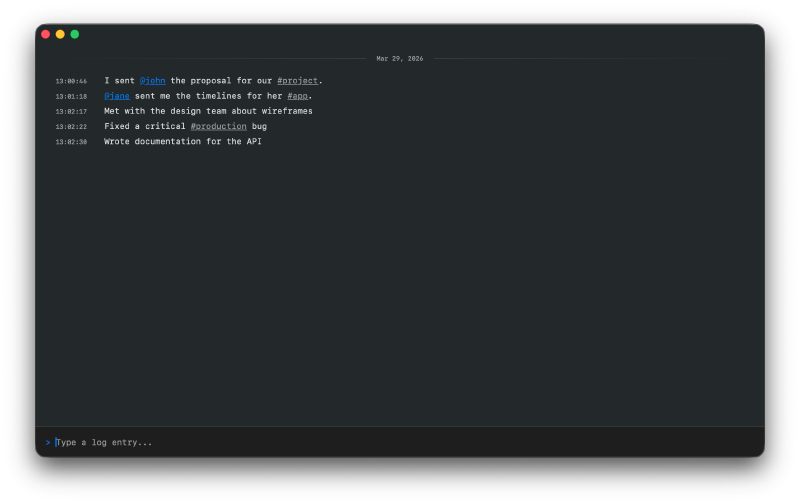
The interface is inspired by the simplicity of a terminal. A single input field is anchored at the bottom of the window. Open the app, type the note, and press Enter to save. The entry is timestamped and added to the chronological log stream.
Intelligent Parsing #
Manual categorization is unnecessary. Worklog uses @mentions and #tags to build a database from unstructured text:
- Mentions: Use
@Johnto link an entry to a specific person. Worklog tracks their history and manages their details automatically. - Tags: Use
#ProjectXto categorize entries by topic or project. - Entity Management: If you rename a person or a tag, the app updates every referencing entry. Unused tags are cleaned up without manual intervention.
Keyboard-Driven Search #
Finding information is as efficient as recording it. Press Cmd+K to open the search overlay.
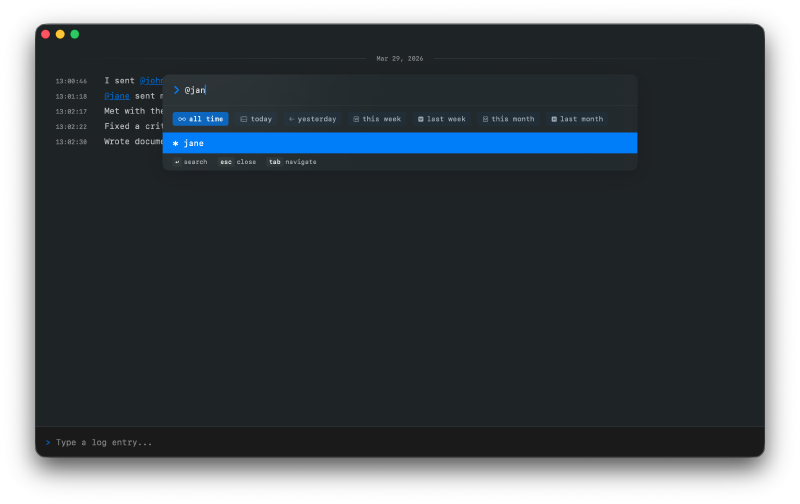
You can filter the log by:
- People and Tags: Filter by specific
@mentionsor#tags. - Text Search: Search for keywords within the log content.
- Time Ranges: Use preset ranges like Today or This Week, or define a custom date range.
Native Performance and Privacy #
Worklog is a native macOS application built with SwiftUI and SwiftData. Because the app runs locally, your data stays on your machine. There is no cloud syncing or third-party server involvement.
Summary of Features #
| Feature | Description |
|---|---|
| Efficient Logging | Capture notes instantly via a single input field. |
| Terminal Aesthetic | Monospaced fonts with highlighted mentions and tags. |
| Smart Autocomplete | Inline suggestions for people and tags. |
| Local Storage | Built on SwiftData for speed and privacy. |
| Advanced Filtering | Combine keywords and time ranges with Cmd+K. |
Worklog is the foundation of my daily workflow. It helps me manage the needs of a busy engineering team without the overhead of complex project management software.
Download Worklog #
Worklog is currently in public beta for macOS. Try it out and simplify your daily logging.
Download Worklog for macOS